







YOUR BOOKS.
YOUR LIBRARY.
WHEREVER YOU GO.
Discover your own beautiful digital bookshelf. Read, listen and enjoy your purchased ELLISERAN books on your tablet or smartphone.
Compatible with Android & iOS (iPhone and iPad)Free to install · Books available with eligible purchases · Offline reading for books saved in advance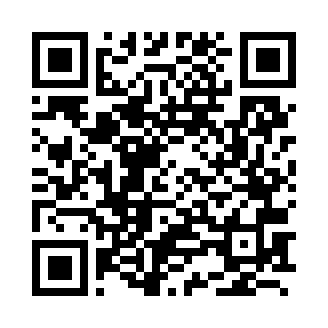 Scan to install
on another device
YOUR LIBRARY, YOUR WAY
All your ELLISERAN stories in one beautiful place
Compatible with Android & iOS — iPhone and iPad
My Elliseran Books brings eligible books you have purchased into a personal digital library. Discover stories, follow a series and choose reading settings that suit you.
Discover everything My Books offers
Your personal bookshelf
Find eligible purchased books together in your library, ready to open without searching through old order emails.
Series, beautifully organised
See series as bookshelf collections, browse volumes in order and return easily to your bookshelf.
EPUB reading
Read supported EPUB editions, navigate chapters and return to your place in the story.
Illustrated children's stories
Enjoy eligible children's titles and their illustrations through the supported protected reading experience.
Nighttime and contrast themes
Switch to a darker reading appearance at night or use high-contrast options for clearer text.
Comfortable, adjustable text
Choose fonts and change text size, line spacing, margins and paragraph spacing in supported text-based books.
Dyslexia-friendly options
Try the dyslexia-friendly reading mode and reading ruler to help follow each line of text.
Bookmarks and reading tools
Keep your place and use bookmarks, highlighting and private notes where supported by the book format.
Read Aloud
Listen using speech voices provided by your device and browser where supported. Voice and offline availability vary.
Discover more books
Explore adult fiction and children's books separately, filter by genre and find your next ELLISERAN story.
Your message inbox
Read new and previous ELLISERAN announcements, delete messages you no longer need and benefit from automatic 30-day retention.
Optional notifications
Choose whether to receive series and promotional announcements. Push notifications require device permission and may vary by browser.
Offline reading where available
Prepare eligible supported books while online before travelling. Not every book format or feature works offline.
One icon, easy access
Add My Books to the Home Screen of a supported phone or tablet, or install it from a compatible desktop browser.
FREE TO INSTALL
Take your library with you
Android & iOS compatible — including iPhone and iPad
Install on the device you're using, or scan the QR code with another phone or tablet. The QR code opens the installation guide on the device you scan with.
Open the installation guide. It will show the simplest installation steps available on your device.
Android phones and tablets
Open in Chrome, tap the three-dot menu and choose Install app or Add to Home screen.
iPhone and iPad
Open in Safari, tap Share, then Add to Home Screen.
Windows computers
Open in Edge or Chrome and choose the browser's available Install app option.
Already installed? Open your My Books library.
Scan to install on another deviceUse your phone or tablet camera to open the guided installation screen.My Elliseran Books is free to install; books are purchased separately. Access depends on your ELLISERAN account and eligible purchases. Some features depend on the book format, browser, device and network connection. Push gateway acceptance does not guarantee a visible device notification. Children's reading mode is not a parental-control system.